Bulk folder export
Select any project folder and export every design in a single pass, including all subfolders. Works on folders with hundreds of files.

Export every design in a folder to STEP, F3D, IGES, SAT, SMT, USD and PDF — preserving your folder structure on disk. No more opening files one by one.
One-time purchase · License key by email · No subscription
 ExportKit Pro
v1.0.0
ExportKit Pro
v1.0.0
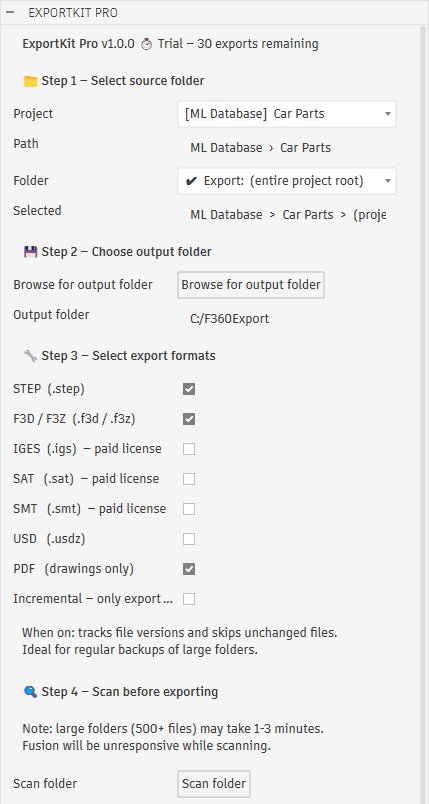
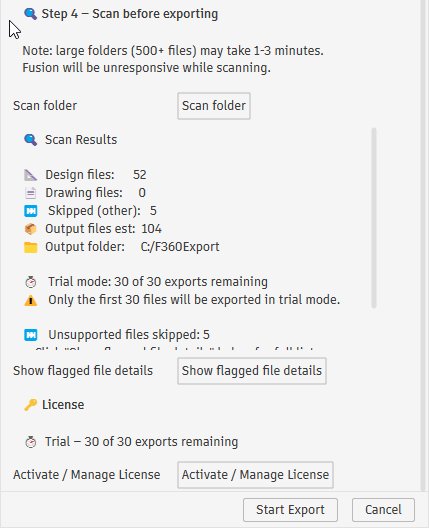
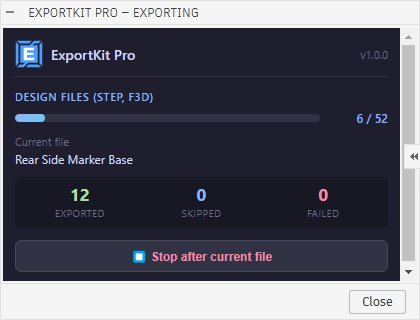
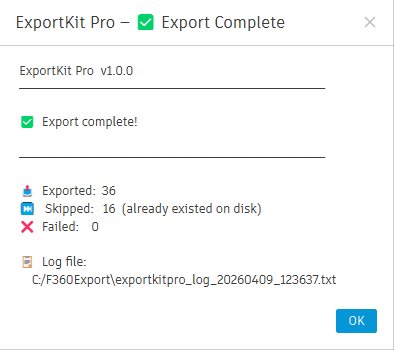
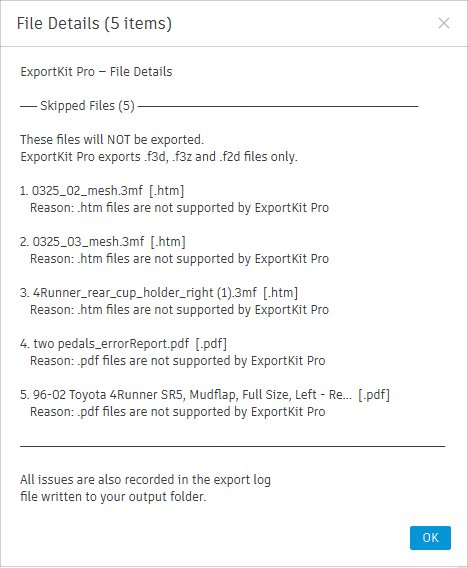
Real screenshots from ExportKit Pro running inside Autodesk Fusion 360.
Built for engineers and designers working with large Fusion 360 project libraries.
Select any project folder and export every design in a single pass, including all subfolders. Works on folders with hundreds of files.
Tracks Fusion version numbers so only new and changed designs are re-exported on repeat runs. Ideal for regular project backups.
If an export is stopped, re-running ExportKit Pro automatically skips files already on disk. No work is ever lost.
A floating progress panel shows the current file, pass, running counts, and a stop button. Always know where you are.
Scan your folder before exporting to see file counts, estimated output, path issues, and your trial or license status.
Exported files are organized on disk exactly like your Fusion hub/project/folder structure. Clean and predictable.
No configuration files, no command line. Everything runs inside Fusion 360.
Download and install from the Autodesk App Store. ExportKit Pro appears in your Fusion Add-Ins panel automatically on the next launch.
Choose your Fusion project folder, select the formats you need — STEP, F3D, PDF and more — and pick an output folder on your drive.
Run a quick pre-export scan to review what will be exported, then click Start Export. Watch live progress as files are exported one by one.
Select any combination — each design is opened once and all selected formats are exported before closing.
No subscriptions, no recurring fees. Pick the license that fits how you work.
Personal, freelance, and non-commercial use
One-time purchase · 1 year of updates
Commercial use, companies and teams
One-time purchase · 1 year of updates
Free trial — export up to 30 files with no registration required.
Questions? support@exportkitpro.com
Practical guides on bulk exporting, backing up, and converting Autodesk Fusion 360 files.
Every method available — from manual workarounds to full automation — for exporting an entire Fusion 360 project in one pass.
Read the guide → BackupWhy cloud-only storage is a risk, which formats preserve design history, and how to automate local backups of your library.
Read the guide → FormatsWhat each export format is for, which ones work on a free license, and which to choose for manufacturing, backup, or AR.
Read the guide → ComparisonAn honest look at the free GitHub export scripts — what they do well, where they fall short, and when a paid add-in is worth it.
Read the guide → DrawingsTurn every drawing in a project into organized PDFs in one pass — no more opening and printing drawings one at a time.
Read the guide → All GuidesThe full library of guides on exporting, backing up, and converting Fusion 360 designs.
View all →Everything you need to know before buying.
Gumroad automatically emails your license key immediately after purchase. Check the email you used at checkout. If you don't see it within a few minutes, check spam. Still stuck? Email support@exportkitpro.com and we'll sort it out.
Open the ExportKit Pro dialog in Fusion, scroll to the License section at the bottom, click "Activate / Manage License", paste your key, and click Activate. Requires an internet connection. Takes a few seconds.
The free trial allows up to 30 file exports with full functionality — all formats, incremental mode, and progress tracking included. No registration or credit card required. After 30 exports a license is required to continue.
STEP, Fusion Archive, USD, and PDF work on all Fusion 360 license tiers including the free personal license. IGES, SAT, and SMT require a paid Autodesk Fusion license. A warning is shown in the scan results if you select these on a free license.
Yes. Your license key can be activated on any machine you own. Install ExportKit Pro and enter your key on each computer.
Your license stays valid and ExportKit Pro continues to work. You only need to renew if you want updates for new Fusion versions released after your first year. Renewal is available at a reduced rate.
Individual is for personal, freelance, or non-commercial use. Business is for commercial use within a company or organization. If using ExportKit Pro as part of paid client work or a company workflow, the Business license applies.